新年新气象,从今天起开始来看 Kafka 的源码。
首先简单描述一下 Kafka 的整体架构:
发布消息的客户端程序称为生产者(Producer),Producer 通常持续不断地向一个或多个 Topic 发送消息,而订阅这些 Topic 的客户端称为消费者(Consumer)。
Kafka 的服务端由多个 Broker 服务进程组成,Broker 负责接收和处理客户端发送过来的请求,以及对消息进行持久化。虽然多个 Broker 进程能够运行在同一台机器上,但更常见的做法是将不同的 Broker 分散运行在不同的机器上。
为了提供可拓展性,Kafka 使用分区机制,把数据分割成多份保存在不同的 Broker 上。Kafka 将每个主题划分成多个分区(Partition),每个 Partition 是一组有序的消息日志。生产者生产的每条消息只会被发送到一个 Partition 中,也就是说如果向一个双分区的主题发送一条消息,这条消息要么在分区 0 中,要么在分区 1 中。
同时,每个分区下可以配置若干个副本(Replica),其中只能有 1 个领导者副本(Leader replica)和 N-1 个追随者副本(Follower Replica),前者对外提供服务,而后者只是被动地追随领导者副本,不能与外界进行交互。生产者向分区写入消息,每条消息在分区中的位置信息由一个叫位移(Offset)的数据来表征。分区位移总是从 0 开始,假设一个生产者向一个空分区写入了 10 条消息,那么这 10 条消息的位移依次是 0、1、2、......、9。
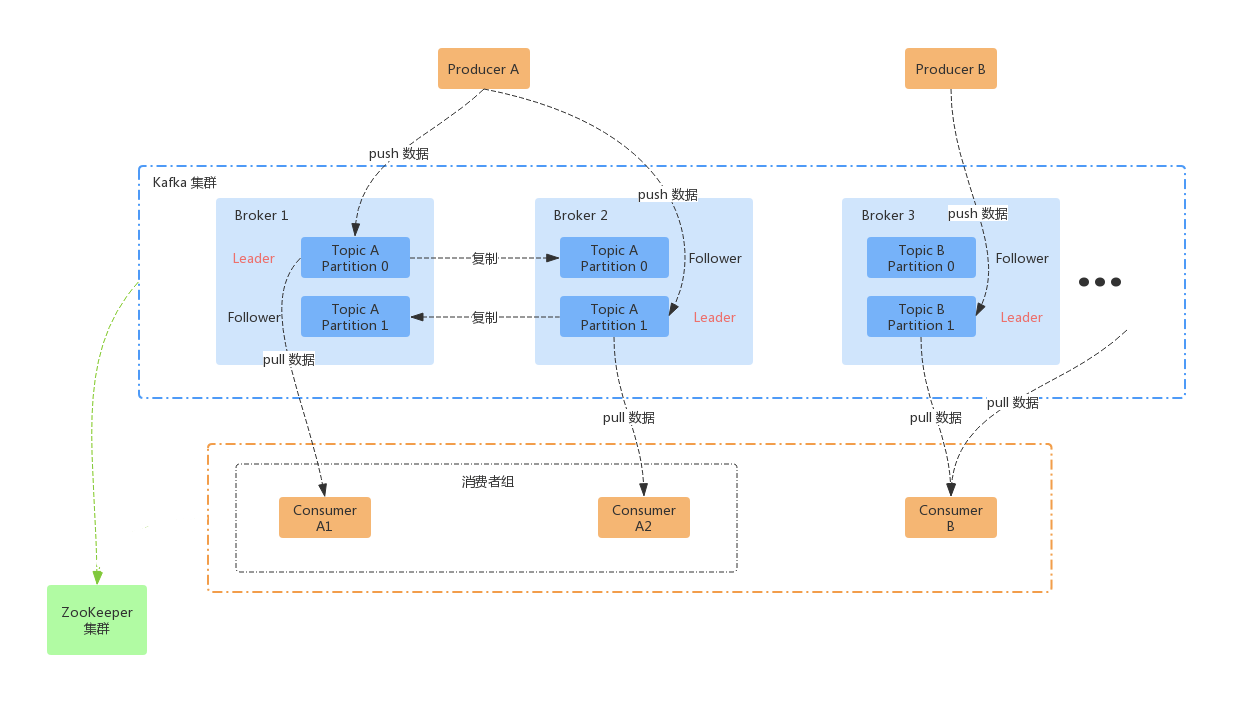
结合上面的图我们再来看:
Producer A 向 Topic A 发型消息,Topic A 有两个分区,所以一条消息有可能在 Partition 0 中,也有可能在 Partition 1 中,这两个分区分别存在 Broker 1 和 Broker 2 上,每一个分区都有一 Follower 个副本。而 Consumer 客户端只能和 Leader 进行交互。
更多的信息这里就不再列举了,网上的内容非常多。
一、Kafka Log 简介
上一节介绍了 Kafka 的基本架构,这一节我们来看看 Kafka Broker 是如何持久化数据的。
一般情况下,一个 Kafka Topic 有很多分区,每个分区就对应一个 Log 对象,在磁盘上则对应于一个子目录。假如你创建了一个双分区的主题 sample-topic,Kafka 就会在磁盘上会创建两个子目录:sample-topic-0 和 sample-topic-1。对于服务器端来说,这就是两个 Log 对象。每个子目录下存在多组日志段,也就是多组.log、.index、.timeindex 文件组合,只不过文件名不同,因为每个日志段的起始位移不同。
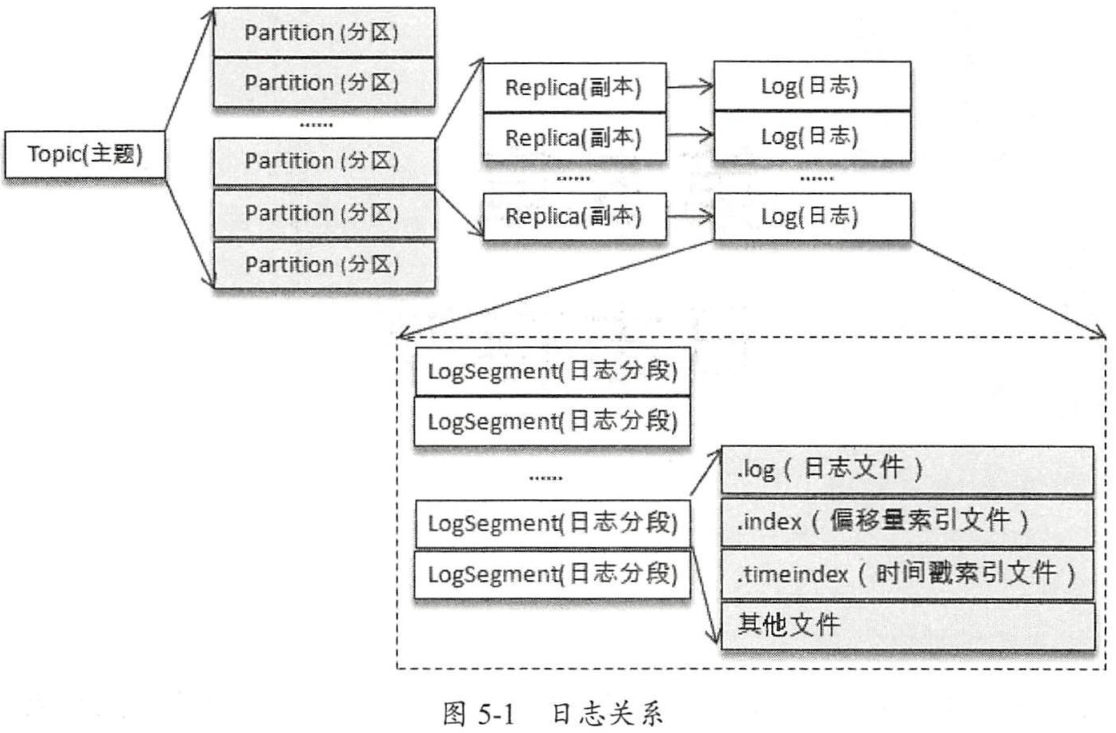
那么,日志段又是什么东西呢?当一个分区中的日志不断积累,为了提升效率,Kafka 就会将日志切分成 LogSegment,新数据只会往最后一个 LogSegment 后面追加,当最后一个 LogSegment 中日志达到一定值之后,继续将它切分。
LogSegment 对应的 .log 文件,这里面是实际的消息;
每当 .log 文件中追加了val LogIndexIntervalBytesProp = "log.index.interval.bytes" 这么多消息之后(默认是 4096 Bytes),会在索引文件中新增一个索引:
- .index 每次会追加两个 Int 整数,总共 8 Bytes;一个是这条消息在当前 Segment 中的相对 offset,另一个是当前日志的总 Bytes 数
- .timeindex 每次会追加一个 Int 一个 Long,总共 12 Bytes;一个是目前收到的消息中,最大的 Timestamp 值,它是 Long 型,另一个是最大 Timestamp 对应的消息的相对 offset。
需要注意的是,.index 文件一定会追加,而 .timeindex 并不是每次都会追加,只有当该条消息对应的 timestamp 大于所有已收到的日志的时候,才会追加,这一点我们在阅读源码的时候会详细说明。
其他文件这里暂时先不做说明,等后续碰到的时候再学习。
二、源码
1. LogSegment 定义
我们先来看看 LogSegment 的定义:
/**
 * A segment of the log. Each segment has two components: a log and an index. The log is a FileRecords containing
 * the actual messages. The index is an OffsetIndex that maps from logical offsets to physical file positions. Each
 * segment has a base offset which is an offset <= the least offset of any message in this segment and > any offset in
 * any previous segment.
 *
 * 日志的 segment。每个 segment 都有两个组件:日志和索引。
 * 日志是一个包含实际消息的 FileRecords。
 * 索引是一个将逻辑偏移映射到物理文件位置的 OffsetIndex 。
 * 每个 segment 都有一个基础偏移 base_offset,它小于当前 segment 中所有消息的最小偏移,
 * 并且大于之前所有 segment 的偏移。
 *
 * A segment with a base offset of [base_offset] would be stored in two files,
 * a [base_offset].index and a [base_offset].log file.
 *
 * segment 信息会被存在两个文件中,即:
 * [base_offset].index
 * [base_offset].log
 *
 * @param log The file records containing log entries
 * @param lazyOffsetIndex The offset index
 * @param lazyTimeIndex The timestamp index
 * @param txnIndex The transaction index
 * @param baseOffset A lower bound on the offsets in this segment
 * @param indexIntervalBytes The approximate number of bytes between entries in the index:
 *                           对应 Broker 端参数 log.index.interval.bytes。默认情况下,
 *                           日志段至少新写入 4KB 的消息数据才会新增一条索引项;假如你写入了一条
 *                           大小为 200KB 的消息,那么会立刻增加一条索引。
 * @param rollJitterMs The maximum random jitter subtracted from the scheduled segment roll time
 *                     随机时间差,每个新增日志段在创建时会彼此岔开一小段时间,这样可以降低物理磁盘的 I/O 负载。
 * @param time The time instance
 */
@nonthreadsafe
class LogSegment private[log] (val log: FileRecords,
                               val lazyOffsetIndex: LazyIndex[OffsetIndex],
                               val lazyTimeIndex: LazyIndex[TimeIndex],
                               val txnIndex: TransactionIndex,
                               val baseOffset: Long,
                               val indexIntervalBytes: Int,
                               val rollJitterMs: Long,
                               val time: Time) extends Logging {......}
而在 kafka 的 Log 对象中,多个 segment 是以 map 的形式存放的,key 是 segment 的 startOffset,value 就是 segment 对象
  /* the actual segments of the log */
  private val segments: ConcurrentNavigableMap[java.lang.Long, LogSegment] = new ConcurrentSkipListMap[java.lang.Long, LogSegment]
2. LogSegment append 方法
/**
   * Append the given messages starting with the given offset. Add
   * an entry to the index if needed.
   *
   * 将内存中的 MemoryRecords append 到 log 文件中
   *
   * It is assumed this method is being called from within a lock.
   * 这个方法是需要在 lock 中执行的
   *
   * @param largestOffset The last offset in the message set
   *                      message set 中最后一条消息在整个分区中的 absolute offset
   * @param largestTimestamp The largest timestamp in the message set.
   *                         message set 中最大的 ts
   * @param shallowOffsetOfMaxTimestamp The offset of the message that has the largest timestamp in the messages to append.
   * @param records The log entries to append.
   * @return the physical position in the file of the appended records
   * @throws LogSegmentOffsetOverflowException if the largest offset causes index offset overflow
   */
  @nonthreadsafe
  def append(largestOffset: Long,
             largestTimestamp: Long,
             shallowOffsetOfMaxTimestamp: Long,
             records: MemoryRecords): Unit = {
    if (records.sizeInBytes > 0) {
      trace(s"Inserting ${records.sizeInBytes} bytes at end offset $largestOffset at position ${log.sizeInBytes} " +
            s"with largest timestamp $largestTimestamp at shallow offset $shallowOffsetOfMaxTimestamp")
      val physicalPosition = log.sizeInBytes()
      if (physicalPosition == 0)
        // used for time based log rolling and for ensuring max compaction delay
        rollingBasedTimestamp = Some(largestTimestamp)

      // baseOffset 是整个 segment 中 offset 的下界
      // 确保 (largestOffset - baseOffset) > 0 且 < Int.Max
      ensureOffsetInRange(largestOffset)

      // append the messages
      // 向 LogSegment 的 FileRecords 中 append MemoryRecords
      // (这里其实就是往底层的 ByteBuffer 中写数据,就不展开看了)
      // 注意: 一个 FileRecords 中,最多保存 Int.Max bytes 的数据,如果超了,这一步会抛出 IllegalArgumentException
      val appendedBytes = log.append(records)
      trace(s"Appended $appendedBytes to ${log.file} at end offset $largestOffset")

      // Update the in memory max timestamp and corresponding offset.
      // 如果插入数据的最后一条的 timestamp,比 timeIndex 中最后一条记录的时间戳大,则:
      // 更新内存中记录着的 timeIndex 中最后一条的记录对应的 时间戳
      // 更新内存中记录着的 timeIndex 中最后一条的记录对应的 offset
      if (largestTimestamp > maxTimestampSoFar) {
        maxTimestampSoFar = largestTimestamp
        offsetOfMaxTimestampSoFar = shallowOffsetOfMaxTimestamp
      }

      // append an entry to the index (if needed)
      // 日志段至少新写入 indexIntervalBytes 的消息数据才会新增一条索引项
      if (bytesSinceLastIndexEntry > indexIntervalBytes) {

        // physicalPosition: append 之前日志的总 Bytes
        // largestOffset: message set 中最后一条消息的 offset。注意这里 largestOffset 是它在整个分区中的绝对 offset,
        // 增加索引的时候,实际记录的是这条 log 在 segment 中的 relative offset,还有它在文件中的物理位置
        // 这两个数字,会以两个 Int 的形式 append 到 offsetIndex 中,这对应着 offsetIndex 中的每一个 entry 的 Size = 8Bytes
        offsetIndex.append(largestOffset, physicalPosition)

        // 只有本次的 ts 和 offset 都比上一次的大的时候,才会真正 append
        // 这两个数字,会以一个 Int 一个 Long 的形式 append 到 timeIndex 中,这对应着 timeIndex 中的 entrySize = 12Bytes
        timeIndex.maybeAppend(maxTimestampSoFar, offsetOfMaxTimestampSoFar)

        // 重置计数器
        bytesSinceLastIndexEntry = 0
      }
      bytesSinceLastIndexEntry += records.sizeInBytes
    }
  }
3. AbstractIndex 定义
前面我们看了 LogSegment 的 append 方法,当 append 完日志原文之后,如果新增的数据量(bytes)达到 indexIntervalBytes,就会向索引文件中追加索引(timeIndex 和 offsetIndex)
而 timeIndex 和 offsetIndex 都继承自 AbstractIndex,我们来看一看它的具体实现:
/**
 * The abstract index class which holds entry format agnostic methods.
 *
 * @param _file The index file
 * @param baseOffset the base offset of the segment that this index is corresponding to.
 *                   上一个 segment 中最后一条日志在分区中的 absolute offset,也就是当前 segment
 *                   的 baseOffset
 * @param maxIndexSize The maximum index size in bytes.
 */
abstract class AbstractIndex(@volatile private var _file: File, val baseOffset: Long, val maxIndexSize: Int = -1,
                             val writable: Boolean) extends Closeable {
  import AbstractIndex._

  // Length of the index file
  @volatile
  private var _length: Long = _

  // entrySize 在子类中有具体的定义,offsetIndex 中是 8Bytes/条,timeIndex 中是 12Bytes/条
  protected def entrySize: Int

  /*
   Kafka mmaps index files into memory, and all the read / write operations of the index is through OS page cache. This
   avoids blocked disk I/O in most cases.

   Kafka mmaps 将索引文件映射到内存中,索引的所有读写操作都通过操作系统的 page cache 进行。这避免了大多数场景下的阻塞磁盘I/O。

   To the extent of our knowledge, all the modern operating systems use LRU policy or its variants to manage page
   cache. Kafka always appends to the end of the index file, and almost all the index lookups (typically from in-sync
   followers or consumers) are very close to the end of the index. So, the LRU cache replacement policy should work very
   well with Kafka's index access pattern.

   据我们所知,所有现代操作系统都使用 LRU 策略或其变体来管理 page cache。Kafka 始终将数据追加到索引文件的末尾,而几乎所有的索引查找
   (通常来自 in-sync followers 或者 consumers)都非常接近索引的末尾。因此,LRU 应该很好地适应Kafka的索引访问模式。

   However, when looking up index, the standard binary search algorithm is not cache friendly, and can cause unnecessary
   page faults (the thread is blocked to wait for reading some index entries from hard disk, as those entries are not
   cached in the page cache).

   然而,在查找索引时,标准的二分查找对缓存并不友好,还有可能导致不必要的 page faults
   (线程由于等待一些未在 page cache 中(实际是在硬盘)的索引条目而被阻塞)。

   For example, in an index with 13 pages, to lookup an entry in the last page (page #12), the standard binary search
   algorithm will read index entries in page #0, 6, 9, 11, and 12.

   例如,在一个包含13个页的索引中,查找最后一页中的条目,标准的二分查找将读取第0、6、9、11、12页的索引条目。

   page number: |0|1|2|3|4|5|6|7|8|9|10|11|12 |
   steps:       |1| | | | | |3| | |4|  |5 |2/6|

   In each page, there are hundreds log entries, corresponding to hundreds to thousands of kafka messages. When the
   index gradually growing from the 1st entry in page #12 to the last entry in page #12, all the write (append)
   operations are in page #12, and all the in-sync follower / consumer lookups read page #0,6,9,11,12. As these pages
   are always used in each in-sync lookup, we can assume these pages are fairly recently used, and are very likely to be
   in the page cache. When the index grows to page #13, the pages needed in a in-sync lookup change to #0, 7, 10, 12,
   and 13:

   在每一页中,有数百个日志条目,对应于几百上千条Kafka消息。当索引从第12页的第一个条目逐渐增长到第12页的最后一个条目时,
   所有的写入(追加)操作都在第12页,而所有的 in-sync follower / consumer 查找时都要读取第0、6、9、11、12页。
   当索引增长到第13页时, in-sync 查找所需的页面变为第0、7、10、12和13页:

   page number: |0|1|2|3|4|5|6|7|8|9|10|11|12|13 |
   steps:       |1| | | | | | |3| | | 4|5 | 6|2/7|

   Page #7 and page #10 have not been used for a very long time. They are much less likely to be in the page cache, than
   the other pages. The 1st lookup, after the 1st index entry in page #13 is appended, is likely to have to read page #7
   and page #10 from disk (page fault), which can take up to more than a second. In our test, this can cause the
   at-least-once produce latency to jump to about 1 second from a few ms.

   第7页和第10页长时间未被使用。相比其他页,它们不太可能存在于 page cache。而在第13页的第一个索引条目附加后的第一个查找,
   可能必须从磁盘读取第7页和第10页,这可能需要超过一秒。在我们的测试中,这会导致至少一次秒级的 produce 延迟。

   Here, we use a more cache-friendly lookup algorithm:

   所以我们使用一种对缓存更友好的查找算法:

   if (target > indexEntry[end - N])
      // if the target is in the last N entries of the index 如果查询的目标在索引的最后 N 个 entries 中
      binarySearch(end - N, end)
   else
      binarySearch(begin, end - N)

   If possible, we only look up in the last N entries of the index. By choosing a proper constant N, all the in-sync
   lookups should go to the 1st branch. We call the last N entries the "warm" section. As we frequently look up in this
   relatively small section, the pages containing this section are more likely to be in the page cache.

   如果可能,我们只在索引的最后N个条目中查找。通过选择适当的常数N,所有的同步查找应该都进入第一个分支。我们称最后N个条目为“热”部分。
   由于我们经常在这个相对较小的部分中查找,包含该部分的 page 更有可能存在于 page cache 中。

   We set N (_warmEntries) to 8192, because

   我们将计算 N 所用的常数设置为 8192 Bytes,因为:
   1. 这个数字足够小,可以确保每次 warm 查询,都会访问所有的 warm-section。这样,warm-section 才配被称为 warm。
      在 warm-section 查找时,会始终访问下面三个 entry:
      indexEntry(end)
      indexEntry(end-N)
      indexEntry((end-N+end)/2)
      如果页面大小>=4096,当我们触及这3个条目时,所有 warm-section page(3个或更少(最后一页并不总是满的,所以是3个或更少))都会被访问。
      截至2018年,4096Bytes 是所有处理器(x86-32、x86-64、MIPS、SPARC、Power、ARM等)的最小页面大小。
   2. 这个数字足够大,以确保大多数 in-sync lookups 都在 warm-section 进行。
      在Kafka默认设置下,
      8KB 索引对应于 1024 条 offsetIndex, 由于每 4KB 日志原文会新增一条索引,所以可以检索出   4MB 的日志原文
      8KB 索引对应于  682 条   timeIndex, 由于每 4KB 日志原文会新增一条索引,所以可以检索出 2.7MB 的日志原文。

   1. This number is small enough to guarantee all the pages of the "warm" section is touched in every warm-section
      lookup. So that, the entire warm section is really "warm".
      When doing warm-section lookup, following 3 entries are always touched: indexEntry(end), indexEntry(end-N),
      and indexEntry((end*2 -N)/2). If page size >= 4096, all the warm-section pages (3 or fewer) are touched, when we
      touch those 3 entries. As of 2018, 4096 is the smallest page size for all the processors (x86-32, x86-64, MIPS,
      SPARC, Power, ARM etc.).
   2. This number is large enough to guarantee most of the in-sync lookups are in the warm-section. With default Kafka
      settings, 8KB index corresponds to about 4MB (offset index) or 2.7MB (time index) log messages.

   We can't set make N (_warmEntries) to be larger than 8192, as there is no simple way to guarantee all the "warm"
   section pages are really warm (touched in every lookup) on a typical 4KB-page host.

   我们不能将这个常数设置为大于8192,因为在典型的4KB页面主机上,没有简单的方法来确保所有 "warm"
   section pages 都是真正 warm 的(在每次查找中都被访问)。

   In there future, we may use a backend thread to periodically touch the entire warm section. So that, we can
   1) support larger warm section
   2) make sure the warm section of low QPS topic-partitions are really warm.

   在将来,我们可能会使用后台线程定期访问整个“热”部分。这样,我们可以:
   1)支持更大的“热”部分
   2)确保低 QPS 主题分区的 warm section 确实是“热”的。
 */

  // entrySize 在子类中有具体的定义,offsetIndex 中是 8Bytes/条,timeIndex 中是 12Bytes/条
  // 这里 _warmEntries 的单位是 条,所以,8192 的单位就是 Bytes
  protected def _warmEntries: Int = 8192 / entrySize

  // mmaps 将索引文件映射到内存中,索引的所有读写操作都通过操作系统的 page cache 进行。
  // 这避免了大多数场景下的阻塞磁盘I/O。
  @volatile
  protected var mmap: MappedByteBuffer = {
    val newlyCreated = file.createNewFile()
    val raf = if (writable) new RandomAccessFile(file, "rw") else new RandomAccessFile(file, "r")
    try {
      /* pre-allocate the file if necessary */
      if(newlyCreated) {
        if(maxIndexSize < entrySize)
          throw new IllegalArgumentException("Invalid max index size: " + maxIndexSize)
        // 先将 maxIndexSize 变为 entrySize 的整数倍,然后设置为 mmap 的 limit(大小),
        // 其实就是 RandomAccessFile 的文件大小
        raf.setLength(roundDownToExactMultiple(maxIndexSize, entrySize))
      }

      /* memory-map the file */
      // 将磁盘上的文件映射到内存中
      _length = raf.length()
      val idx = {
        // FileChannel.map 方法: FileChannelImpl 中通过反射的方式,调用:
        // java.nio.DirectByteBuffer.DirectByteBuffer(int, long, java.io.FileDescriptor, java.lang.Runnable)
        // 构造出来 MappedByteBuffer。
        //
        // length 来自于当前对象 AbstractIndex 的构造方法的入参,对应 kafka 配置项:log.index.size.max.bytes
        // 它的默认值 LogIndexSizeMaxBytes = 10*1024*1024
        //
        // 我们据此可已计算出:
        // OffsetIndex 最多可以存储 10*1024*1024/8 = 1310720 条数据
        // TimeIndex 最多可以存储 10*1024*1024(先缩减到12的倍数)/12 = 873813 条数据
        if (writable)
          raf.getChannel.map(FileChannel.MapMode.READ_WRITE, 0, _length)
        else
          raf.getChannel.map(FileChannel.MapMode.READ_ONLY, 0, _length)
      }

      /* set the position in the index for the next entry */
      if(newlyCreated)
        idx.position(0)
      else {
        // if this is a pre-existing index, assume it is valid and set position to last entry
        // 如果是已存在的 file 映射出的 MappedByteBuffer, 我们且认为他是有效的,把 position 放到整个文件的最后
        // (表示当前文件已满,这样,再有新增的条目的话,就不会破坏原来的文件,而是重新新增 index)
        idx.position(roundDownToExactMultiple(idx.limit(), entrySize))
      }
      idx
    } finally {
      CoreUtils.swallow(raf.close(), AbstractIndex)
    }
  }

  /**
   * The maximum number of entries this index can hold
   */
  @volatile
  private[this] var _maxEntries: Int = mmap.limit() / entrySize

  /** The number of entries in this index */
  @volatile
  protected var _entries: Int = mmap.position() / entrySize
持有着着磁盘上 index 文件的 RandomAccessFile 对象,同时使用了一种比较精巧的方法来提升查询效率。
1. offsetIndex.append()
回过头来,我们再看 append 方法的实现,其实就是向 mmap 中 append 两个 Integer
  /**
   * Append an entry for the given offset/location pair to the index. This entry must have a larger offset than all subsequent entries.
   * @throws IndexOffsetOverflowException if the offset causes index offset to overflow
   */
  def append(offset: Long, position: Int): Unit = {
    inLock(lock) {
      require(!isFull, "Attempt to append to a full index (size = " + _entries + ").")

      // 如果一条数据都没有,直接 put || 如果 offset 合法,则可以 put
      if (_entries == 0 || offset > _lastOffset) {
        trace(s"Adding index entry $offset => $position to ${file.getAbsolutePath}")

        // 这里是将(相对于整个分区的)绝对 offset,转变为(相对于当前 segment 的)相对 offset,方便后续查找
        mmap.putInt(relativeOffset(offset))
        mmap.putInt(position)
        _entries += 1
        _lastOffset = offset

        // 防御性编程,确保增加一个 entry(put 两个 Int)之后,mmap 的 position 是正确的
        require(_entries * entrySize == mmap.position(), s"$entries entries but file position in index is ${mmap.position()}.")
      } else {
        throw new InvalidOffsetException(s"Attempt to append an offset ($offset) to position $entries no larger than" +
          s" the last offset appended (${_lastOffset}) to ${file.getAbsolutePath}.")
      }
    }
  }
2. timeIndex.maybeAppend()
同样的,timeIndex 的 append 方法的实现,其实就是向 mmap 中 append 一个 Integer 一个 Long
/**
   * Attempt to append a time index entry to the time index.
   * The new entry is appended only if both the timestamp and offsets are greater than the last appended timestamp and
   * the last appended offset.
   *
   * 为了确保确保了时间索引中的条目是递增的,并且能够有效地支持时间范围查询
   * 只有本次的 ts > 上一次 并且 offset >= 上一次的时候,才会 append
   *
   * @param timestamp The timestamp of the new time index entry
   * @param offset The offset of the new time index entry
   * @param skipFullCheck To skip checking whether the segment is full or not. We only skip the check when the segment
   *                      gets rolled or the segment is closed.
   */
  def maybeAppend(timestamp: Long, offset: Long, skipFullCheck: Boolean = false): Unit = {
    inLock(lock) {
      if (!skipFullCheck)
        require(!isFull, "Attempt to append to a full time index (size = " + _entries + ").")

      // We do not throw exception when the offset equals to the offset of last entry. That means we are trying
      // to insert the same time index entry as the last entry.
      // 偏移量等于最后条目的偏移量时不抛出异常。这意味着试图插入与最后条目相同的时间索引。
      //
      // If the timestamp index entry to be inserted is the same as the last entry, we simply ignore the insertion
      // because that could happen in the following two scenarios:
      // 出现这种情况时,我们只是忽略插入,因为这可能发生在以下两种情况下:
      //
      // 1. A log segment is closed.
      // 2. LogSegment.onBecomeInactiveSegment() is called when an active log segment is rolled.
      //
      // 1. 日志段已关闭。
      // 2. 在激活的日志段变为关闭时调用了 LogSegment.onBecomeInactiveSegment()。这会给 timeIndex 最后 append 一个 segment 中
      //    最大的时间戳,这个时间戳用来决定什么时候删除这个 segment。

      if (_entries != 0 && offset < lastEntry.offset)
        throw new InvalidOffsetException(s"Attempt to append an offset ($offset) to slot ${_entries} no larger than" +
          s" the last offset appended (${lastEntry.offset}) to ${file.getAbsolutePath}.")

      if (_entries != 0 && timestamp < lastEntry.timestamp)
        throw new IllegalStateException(s"Attempt to append a timestamp ($timestamp) to slot ${_entries} no larger" +
          s" than the last timestamp appended (${lastEntry.timestamp}) to ${file.getAbsolutePath}.")

      // We only append to the time index when the timestamp is greater than the last inserted timestamp.
      // If all the messages are in message format v0, the timestamp will always be NoTimestamp. In that case, the time
      // index will be empty.
      if (timestamp > lastEntry.timestamp) {
        trace(s"Adding index entry $timestamp => $offset to ${file.getAbsolutePath}.")
        mmap.putLong(timestamp)
        mmap.putInt(relativeOffset(offset))
        _entries += 1
        _lastEntry = TimestampOffset(timestamp, offset)
        require(_entries * entrySize == mmap.position(), s"${_entries} entries but file position in index is ${mmap.position()}.")
      }
    }
  }
4. 查找索引
现在,我们已经知道索引的基本结构了,我们以 offsetIndex 为例,来看一看如何在其中查找内容:
    /**
   * Find the largest offset less than or equal to the given targetOffset
   * and return a pair holding this offset and its corresponding physical file position.
   *
   * 在索引文件中查找 offset 刚好小于等于 targetOffset 的那一个
   *
   * @param targetOffset The offset to look up.
   *                     相对位置
   * @return The offset found and the corresponding file position for this offset
   *         If the target offset is smaller than the least entry in the index (or the index is empty),
   *         the pair (baseOffset, 0) is returned.
   *         返回索引对应的 item 的 absolute offset 以及 physical position
   */
  def lookup(targetOffset: Long): OffsetPosition = {
    maybeLock(lock) {
      val idx = mmap.duplicate

      // 在索引文件中查找 offset 刚好小于等于 targetOffset 的那一个
      // (targetOffset 就是处于这个索引对应的数据块中)
      // slot 是指索引在 offsetIndex 中的第几条
      val slot = largestLowerBoundSlotFor(idx, targetOffset, IndexSearchType.KEY)

      if (slot == -1)
      // 如果没找到,则说明 targetOffset 比索引文件中所有的都小,则返回(索引文件的起始 offset, 起始 physical position=0)
        OffsetPosition(baseOffset, 0)
      else {
        // 如果确定 targetOffset 在当前索引所对应的 log 中,则返回索引中存储的信息
        // 1. 当前索引对应的 item 的绝对 offset
        // 2. 当前索引对应的 item 在 log 文件中的物理位置
        parseEntry(idx, slot)
      }
    }
  }
largestLowerBoundSlotFor 定义在父类 AbstractIndex 中,同时还有一个smallestUpperBoundSlotFor方法(他们都调用了indexSlotRangeFor 方法—),见名知义,是为了获取 targetOffset 处于哪两个索引之间:
  /**
   * Find the slot in which the largest entry less than or equal to the given target key or value is stored.
   * The comparison is made using the `IndexEntry.compareTo()` method.
   *
   * 找到索引文件中 offset 刚好 <= target 的那一个
   * 如果 target 比索引文件中所有的都大,就返回索引的最后一项
   * 如果 target 比索引文件中所有的都小,就返回 -1
   *
   * @param idx The index buffer
   * @param target The index key to look for
   * @return The slot found or -1 if the least entry in the index is larger than the target key or the index is empty
   */
  protected def largestLowerBoundSlotFor(idx: ByteBuffer, target: Long, searchEntity: IndexSearchEntity): Int =
    indexSlotRangeFor(idx, target, searchEntity)._1

  /**
   * Find the smallest entry greater than or equal the target key or value. If none can be found, -1 is returned.
   *
   * 找到索引文件中 position 刚好 >= target(physical position) 的那一个
   * 如果 target 比索引文件中所有的都小,就返回 0
   * 如果 target 比索引文件中所有的都大,就返回 -1
   *
   */
  protected def smallestUpperBoundSlotFor(idx: ByteBuffer, target: Long, searchEntity: IndexSearchEntity): Int =
    indexSlotRangeFor(idx, target, searchEntity)._2
重头戏登场,使用二分查找来查询 target 所处数据块的上下边界(offset),这里就用到了我们上面介绍的 _warmEntries 参数:
  /**
   * Lookup lower and upper bounds for the given target.
   */
  private def indexSlotRangeFor(idx: ByteBuffer, target: Long, searchEntity: IndexSearchEntity): (Int, Int) = {
    //这里的 target 是 segment 中的相对 offset

    // check if the index is empty
    if(_entries == 0)
      return (-1, -1)

    def binarySearch(begin: Int, end: Int) : (Int, Int) = {
      // binary search for the entry
      var lo = begin
      var hi = end
      while(lo < hi) {
        val mid = (lo + hi + 1) >>> 1
        // 把数组下标,转化为 offset
        val found = parseEntry(idx, mid)
        // 这里是 java.lang.Long.compare
        // 根据 searchEntity = key/value,比较 index 的 logical log offset 或者 physical position
        val compareResult = compareIndexEntry(found, target, searchEntity)
        if(compareResult > 0)
          hi = mid - 1
        else if(compareResult < 0)
          lo = mid
        else
          return (mid, mid)
      }
      (lo, if (lo == _entries - 1) -1 else lo + 1)
    }

    // 找到第一条 warm entry(warm entry 在 page cache 中,访问起来比较快)
    val firstHotEntry = Math.max(0, _entries - 1 - _warmEntries)

    // check if the target offset is in the warm section of the index
    // 如果 target 处在 warm section,即 firstHotEntry 比 target 小,直接在 warm section 二分查找就可以
    if(compareIndexEntry(parseEntry(idx, firstHotEntry), target, searchEntity) < 0) {
      // 找到就返回 (target, target),找不到就返回 (_entries-1, -1)
      return binarySearch(firstHotEntry, _entries - 1)
    }

    // check if the target offset is smaller than the least offset
    // 如果第一条 index 中记录的 offset 也比 target 大,说明不在当前 index 中
    if(compareIndexEntry(parseEntry(idx, 0), target, searchEntity) > 0)
      return (-1, 0)

    // 如果 target 在 cold section,直接二分查找
    // 找到就返回 (target, target),找不到就返回 (0, 1)
    binarySearch(0, firstHotEntry)
  }
如果在索引中找到了对应的 targetOffset(相对位置),则调用下面的 parseEntry 方法,返回当前 segment 的 offset 以及在日志文件中的 physical position:
  // 这里的 n 就是指,当前 offsetIndex 中的第 n 项(索引),里面存的是 item 的相对 offset值和物理位置
  override protected def parseEntry(buffer: ByteBuffer, n: Int): OffsetPosition = {
    // offset: 基础 offset 加上第 n 条 index 中保存的 offset 值
    OffsetPosition(baseOffset + relativeOffset(buffer, n), physical(buffer, n))
  }

  private def relativeOffset(buffer: ByteBuffer, n: Int): Int = buffer.getInt(n * entrySize)

  // +4 是因为 offset 和 position 连着的,这里要跳过 offset
  private def physical(buffer: ByteBuffer, n: Int): Int = buffer.getInt(n * entrySize + 4)
至此,我们就大致了解了索引的数据结构。下面介绍根据 offset 从 segment 中查找具体数据的方法,就用到了上面查找索引的方法。
5. LogSegment read 方法
/**
   * Read a message set from this segment beginning with the first offset >= startOffset. The message set will include
   * no more than maxSize bytes and will end before maxOffset if a maxOffset is specified.
   *
   * 从 segment 的开头,读取 message set。
   * message set 的大小可以通过 maxSize bytes 和 maxOffset(maxPosition) 来限制。
   *
   * @param startOffset A lower bound on the first offset to include in the message set we read
   *                    消息的相对 offset
   * @param maxSize The maximum number of bytes to include in the message set we read
   * @param maxPosition The maximum position in the log segment that should be exposed for read
   * @param minOneMessage If this is true, the first message will be returned even if it exceeds `maxSize` (if one exists)
   *                      至少返回一条消息(即便超过了 maxSize 的限制)
   *
   * @return The fetched data and the offset metadata of the first message whose offset is >= startOffset,
   *         or null if the startOffset is larger than the largest offset in this log
   */
  @threadsafe
  def read(startOffset: Long,
           maxSize: Int,
           maxPosition: Long = size,
           minOneMessage: Boolean = false): FetchDataInfo = {
    if (maxSize < 0)
      throw new IllegalArgumentException(s"Invalid max size $maxSize for log read from segment $log")

    // 这里首先去查索引,调用了上面介绍过的 offsetIndex.lookup 方法,得到索引对应的 absolute offset 和 physical position
    // 但是索引并不一定对应着我们要查找的消息本身,所以会再去根据索引对应的消息为起点,去 log 文件中,按照 batch 遍历整个
    // log 文件,最终查找到一个 batch 的消息,这个 batch 是以 offset、position、byteSize 标识的
    val startOffsetAndSize = translateOffset(startOffset)

    // if the start position is already off the end of the log, return null
    // 当前 segment 中,所有的 offset 都比 startOffset 小
    if (startOffsetAndSize == null)
      return null

    val startPosition = startOffsetAndSize.position
    // startOffset 目标 offset
    // baseOffset 当前 segment 的起始 offset
    // startPosition: startOffset 在当前 segment 的物理位置
    val offsetMetadata = LogOffsetMetadata(startOffset, this.baseOffset, startPosition)

    // 用 maxSize 约束将要读取的文件大小
    val adjustedMaxSize =
      if (minOneMessage) math.max(maxSize, startOffsetAndSize.size)
      else maxSize

    // return a log segment but with zero size in the case below
    if (adjustedMaxSize == 0)
      return FetchDataInfo(offsetMetadata, MemoryRecords.EMPTY)

    // calculate the length of the message set to read based on whether or not they gave us a maxOffset
    // 用 maxPosition 约束将要读取的文件大小
    val fetchSize: Int = min((maxPosition - startPosition).toInt, adjustedMaxSize)

    // 这里是从原始 log 文件中,标记一块内容(一批 record)出来,startOffset 就是其中的第一条
    FetchDataInfo(offsetMetadata, log.slice(startPosition, fetchSize),
      firstEntryIncomplete = adjustedMaxSize < startOffsetAndSize.size)
  }
6. FileRecords
在上面 LogSegment 的构造方法中,有一个 FileRecords 对象:
public class FileRecords extends AbstractRecords implements Closeable {
    private final boolean isSlice;
    private final int start;
    private final int end;

    private final Iterable<FileLogInputStream.FileChannelRecordBatch> batches;

    // mutable state
    private final AtomicInteger size;
    private final FileChannel channel;
    private volatile File file;
}
再结合下面的 UML 图:
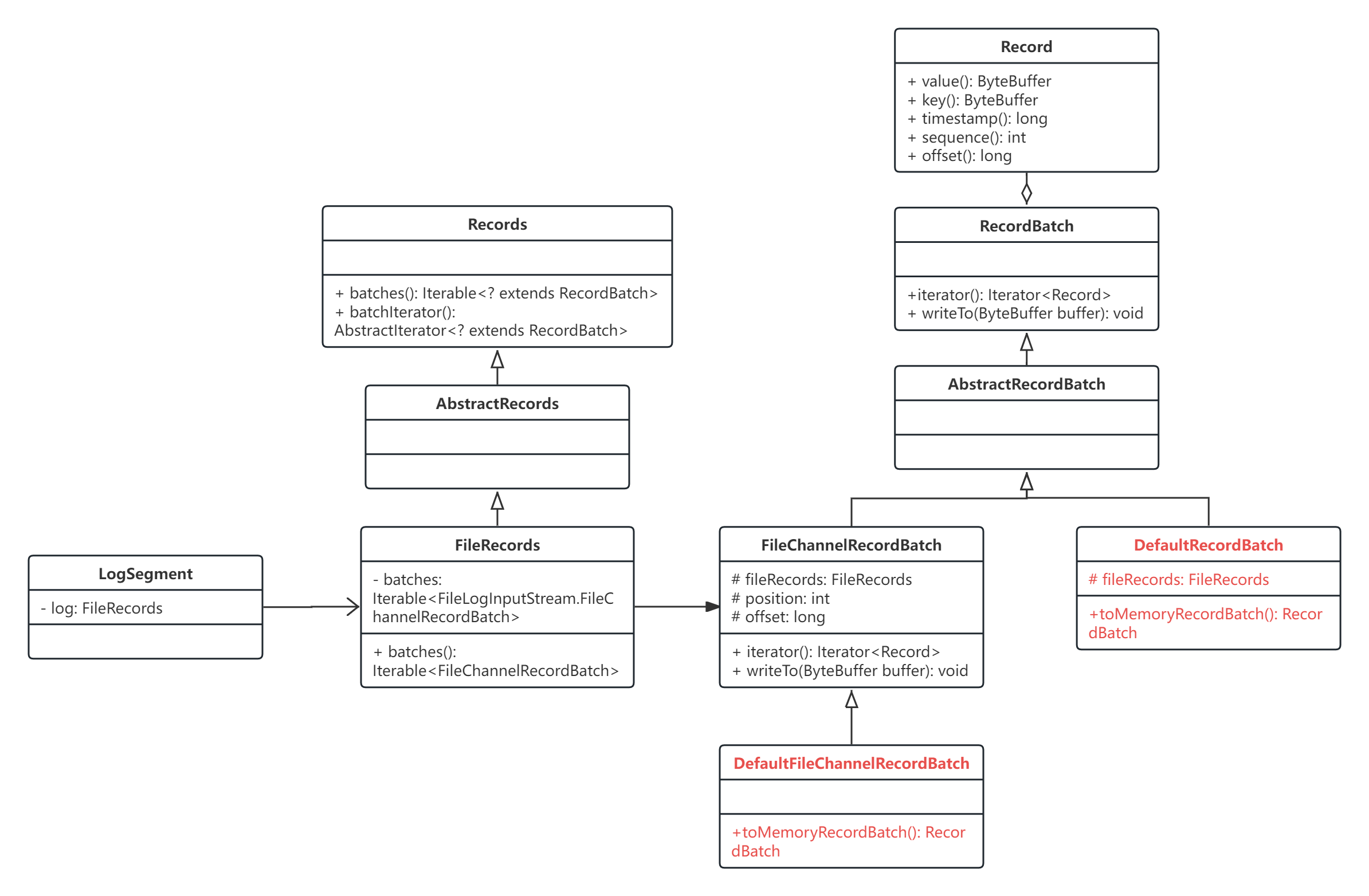
我们可以看出,LogSegment 中保存着一个 FileRecords,FileRecords 中保存着一个 java.nio.FileChannel 这就是底层 log 文件,log 文件中有多个 batch 的数据,这些多个 batch 的数据以 iterable FileChannelRecordBatch 的形式储存,实现类是 DefaultFileChannelRecordBatch,真正需要使用的时候,会通过 DefaultFileChannelRecordBatch.toMemoryRecordBatch() 将磁盘上的数据转化到内存中,即代表当前 batch 的 java.nio.ByteBuffer,成为 DefaultRecordBatch 对象。
从 DefaultRecordBatch 的注释中,我们就可以简单了解它的具体结构:
/**
 * RecordBatch implementation for magic 2 and above. The schema is given below:
 *
 * RecordBatch =>
 *  BaseOffset => Int64
 *  Length => Int32
 *  PartitionLeaderEpoch => Int32
 *  Magic => Int8
 *  CRC => Uint32
 *  Attributes => Int16
 *  LastOffsetDelta => Int32 // also serves as LastSequenceDelta
 *  FirstTimestamp => Int64
 *  MaxTimestamp => Int64
 *  ProducerId => Int64
 *  ProducerEpoch => Int16
 *  BaseSequence => Int32
 *  Records => [Record]
 *
 * Note that when compression is enabled (see attributes below), the compressed record data is serialized
 * directly following the count of the number of records.
 *
 * 当启用了压缩时,压缩后的记录数据会直接 serialized 在记录数量之后
 *
 * The CRC covers the data from the attributes to the end of the batch (i.e. all the bytes that follow the CRC). It is
 * located after the magic byte, which means that clients must parse the magic byte before deciding how to interpret
 * the bytes between the batch length and the magic byte. The partition leader epoch field is not included in the CRC
 * computation to avoid the need to recompute the CRC when this field is assigned for every batch that is received by
 * the broker. The CRC-32C (Castagnoli) polynomial is used for the computation.
 *
 * CRC校验覆盖从 attributes 开始到 batch 结尾的数据(即CRC之后的所有字节)。它位于 magic 字节之后,这意味着客户端必须先解析 magic 字节,
 * 然后再决定如何解析 batch 长度和 magic 字节之间的字节。为了避免每次 broker 接收到 batch 时重新计算 CRC,
 * 分区 leader 的 epoch 字段不包括在 CRC 中。
 * CRC计算使用CRC-32C (Castagnoli)多项式。
 *
 * On Compaction: Unlike the older message formats, magic v2 and above preserves the first and last offset/sequence
 * numbers from the original batch when the log is cleaned. This is required in order to be able to restore the
 * producer's state when the log is reloaded. If we did not retain the last sequence number, then following
 * a partition leader failure, once the new leader has rebuilt the producer state from the log, the next sequence
 * expected number would no longer be in sync with what was written by the client. This would cause an
 * unexpected OutOfOrderSequence error, which is typically fatal. The base sequence number must be preserved for
 * duplicate checking: the broker checks incoming Produce requests for duplicates by verifying that the first and
 * last sequence numbers of the incoming batch match the last from that producer.
 *
 * Note that if all of the records in a batch are removed during compaction, the broker may still retain an empty
 * batch header in order to preserve the producer sequence information as described above. These empty batches
 * are retained only until either a new sequence number is written by the corresponding producer or the producerId
 * is expired from lack of activity.
 *
 * There is no similar need to preserve the timestamp from the original batch after compaction. The FirstTimestamp
 * field therefore always reflects the timestamp of the first record in the batch. If the batch is empty, the
 * FirstTimestamp will be set to -1 (NO_TIMESTAMP).
 *
 * Similarly, the MaxTimestamp field reflects the maximum timestamp of the current records if the timestamp type
 * is CREATE_TIME. For LOG_APPEND_TIME, on the other hand, the MaxTimestamp field reflects the timestamp set
 * by the broker and is preserved after compaction. Additionally, the MaxTimestamp of an empty batch always retains
 * the previous value prior to becoming empty.
 *
 * The current attributes are given below:
 *
 *  -------------------------------------------------------------------------------------------------
 *  | Unused (6-15) | Control (5) | Transactional (4) | Timestamp Type (3) | Compression Type (0-2) |
 *  -------------------------------------------------------------------------------------------------
 */
public class DefaultRecordBatch extends AbstractRecordBatch implements MutableRecordBatch {
    ......
}