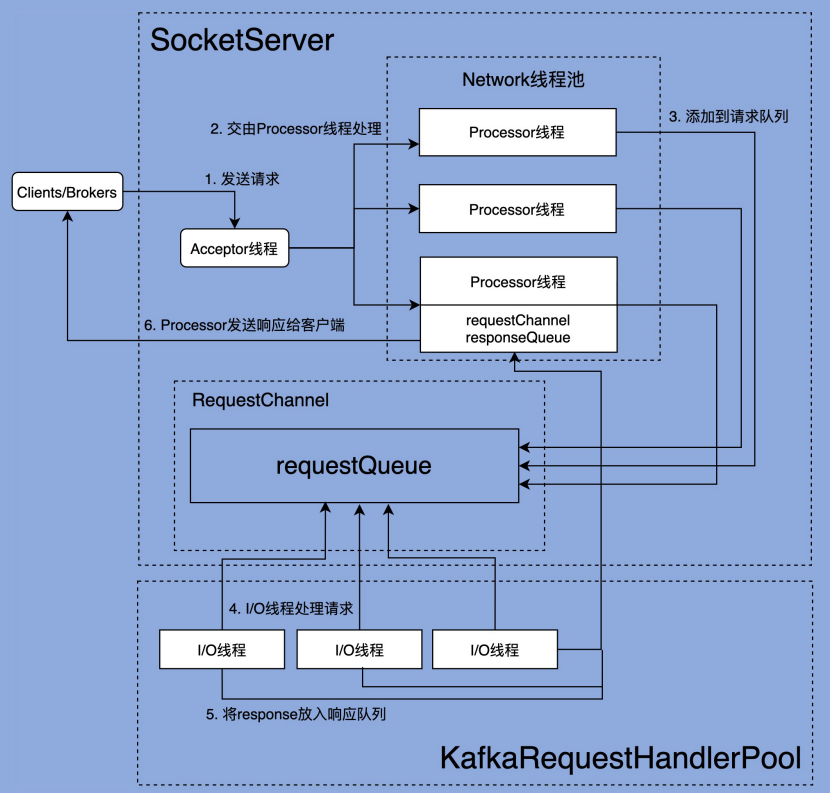
/** * Handles new connections, requests and responses to and from broker. * Kafka supports two types of request planes : * - data-plane : * - Handles requests from clients and other brokers in the cluster. * - The threading model is * 1 Acceptor thread per listener, that handles new connections. * It is possible to configure multiple data-planes by specifying multiple "," separated endpoints for "listeners" in KafkaConfig. * Acceptor has N Processor threads that each have their own selector and read requests from sockets * M Handler threads that handle requests and produce responses back to the processor threads for writing. * - control-plane : * - Handles requests from controller. This is optional and can be configured by specifying "control.plane.listener.name". * If not configured, the controller requests are handled by the data-plane. * - The threading model is * 1 Acceptor thread that handles new connections * Acceptor has 1 Processor thread that has its own selector and read requests from the socket. * 1 Handler thread that handles requests and produce responses back to the processor thread for writing. * * Kafka 支持两个层面的 request * - 数据面: * - 处理来自客户端和其他 broker 的请求 * - 线程模型是: * 每一个监听器对应一个 Acceptor 线程,处理新连接。 * 也可以配置多个监听器,只需要在 KafkaConfig 的 listeners endpoint 中用多个 "," 分隔即可。 * 每个 Acceptor 线程有 N 个 Processor 线程,每个 Processor 线程都有自己的 selector, * 可以从 socket 中读取 request * 然后会有 M 个 Handler 线程来处理读到的请求,处理完后会再通过 Processor 返回 response * - 控制面 * - 处理来自 controller 的请求。但是如果不在配置中指定 "control.plane.listener.name", * 那么两种类型的请求都会交由数据面处理 * - 线程模型是: * 有一个 Acceptor 线程处理新连接。 * Acceptor 线程有一个 Processor 线程的 ,Processor 有自己的 selector, * 可以从 socket 中读取 request * 有一个 Handler 线程处理 request,然后生成 response 通过 processor 线程返回 * */ classSocketServer(val config: KafkaConfig, val metrics: Metrics, val time: Time, val credentialProvider: CredentialProvider) extendsLoggingwithKafkaMetricsGroupwithBrokerReconfigurable { ......
// data-plane privateval dataPlaneProcessors = newConcurrentHashMap[Int, Processor]() private[network] val dataPlaneAcceptors = newConcurrentHashMap[EndPoint, Acceptor]() val dataPlaneRequestChannel = newRequestChannel(maxQueuedRequests, DataPlaneMetricPrefix, time)
/** * Starts the socket server and creates all the Acceptors and the Processors. The Acceptors * start listening at this stage so that the bound port is known when this method completes * even when ephemeral ports are used. Acceptors and Processors are started if `startProcessingRequests` * is true. If not, acceptors and processors are only started when [[kafka.network.SocketServer#startProcessingRequests()]] * is invoked. Delayed starting of acceptors and processors is used to delay processing client * connections until server is fully initialized, e.g. to ensure that all credentials have been * loaded before authentications are performed. Incoming connections on this server are processed * when processors start up and invoke [[org.apache.kafka.common.network.Selector#poll]]. * * 启动 socket server 创建所有的 acceptor 和 processor。acceptor 从此刻开始监听, * 即便使用的是操作系统分配的临时端口,当该方法执行完成时,也能够确定具体绑定的端口了。 * * 只有当调用了 startProcessingRequests() 且返回 true 的时候,Acceptors 和 Processors 才会启动。 * 延迟启动接收器和处理器的目的是在服务器完全初始化之前延迟处理客户端连接, * 例如,确保在执行身份验证之前已加载所有凭据。 * (KafkaServer 启动的时候,会调用 startup 方法,但 startProcessingRequests 参数是 false, * 即不会立刻启动 Acceptors 和 Processors) * * 当处理器启动并调用 [[org.apache.kafka.common.network.Selector#poll]] 时, * 服务器上的传入连接会被处理。 * * @param startProcessingRequests Flag indicating whether `Processor`s must be started. */ defstartup(startProcessingRequests: Boolean = true): Unit = { this.synchronized {
// 连接数配额。我们能够借此设置单个 ip 和 Broker 的最大连接数 // 以及单个 Broker 能够允许的最大连接数 connectionQuotas = newConnectionQuotas(config, time, metrics)
// `shutdown()` is invoked before `startupComplete` and `shutdownComplete` if an exception is thrown in the constructor // (e.g. if the address is already in use). We want `shutdown` to proceed in such cases, so we first assign an open // latch and then replace it in `startupComplete()`. // // 如果在构造方法中抛出异常,shutdown() 就会先于 startupComplete 和 shutdownComplete 调用(比如说端口被占用的情况) // 这时候,如果 shutdownLatch = new CountDownLatch(0),shutdown 方法还是可以正常运行的。 // 为了 cover 这个场景,这里初始化的时候,会给他设为0。 // 正常运行的情况下,执行 startupComplete 方法的时候,会赋值为 1 @volatileprivatevar shutdownLatch = newCountDownLatch(0)
privateval alive = newAtomicBoolean(true)
defwakeup(): Unit
/** * Initiates a graceful shutdown by signaling to stop */ definitiateShutdown(): Unit = { if (alive.getAndSet(false)) wakeup() }
/** * Wait for the thread to completely shutdown */ defawaitShutdown(): Unit = shutdownLatch.await
/** * Returns true if the thread is completely started */ defisStarted(): Boolean = startupLatch.getCount == 0
/** * Wait for the thread to completely start up */ defawaitStartup(): Unit = startupLatch.await
/** * Record that the thread startup is complete */ protecteddefstartupComplete(): Unit = { // Replace the open latch with a closed one shutdownLatch = newCountDownLatch(1) startupLatch.countDown() }
/** * Record that the thread shutdown is complete */ protecteddefshutdownComplete(): Unit = shutdownLatch.countDown()
/** * Is the server still running? */ protecteddefisRunning: Boolean = alive.get
/** * Thread that accepts and configures new connections. There is one of these per endpoint. */ private[kafka] classAcceptor(val endPoint: EndPoint, val sendBufferSize: Int, val recvBufferSize: Int, brokerId: Int, connectionQuotas: ConnectionQuotas, metricPrefix: String) extendsAbstractServerThread(connectionQuotas) withKafkaMetricsGroup{
/** * Accept loop that checks for new connection attempts * * 循环等待新连接 */ defrun(): Unit = { serverChannel.register(nioSelector, SelectionKey.OP_ACCEPT)
// shutdownLatch = new CountDownLatch(1) // startupLatch.countDown() startupComplete()
try { var currentProcessorIndex = 0 while (isRunning) { try { // 监听就绪的I/O事件 val ready = nioSelector.select(500) if (ready > 0) { val keys = nioSelector.selectedKeys() val iter = keys.iterator() while (iter.hasNext && isRunning) { try { val key = iter.next iter.remove()
if (key.isAcceptable) {
// 调用 ServerSocketChannel.accept 方法创建 Socket 连接 accept(key).foreach { socketChannel => // Assign the channel to the next processor (using round-robin) to which the // channel can be added without blocking. If newConnections queue is full on // all processors, block until the last one is able to accept a connection. // // 循环遍历 processor,直到找到不阻塞,可以直接添加 SocketChannel 的 processor // (processor 内部实际上使用一个 ArrayBlockingQueue[SocketChannel] 保存新连接的) // 如果所有的 processor 都是满的,就阻塞当前线程,直到遍历的最后一个 processor 可以添加连接 // (即:retriesLeft == 0) var retriesLeft = synchronized(processors.length) var processor: Processor = null do { retriesLeft -= 1 processor = synchronized { // adjust the index (if necessary) and retrieve the processor atomically for // correct behaviour in case the number of processors is reduced dynamically // // 防止 index 越界 currentProcessorIndex = currentProcessorIndex % processors.length processors(currentProcessorIndex) } currentProcessorIndex += 1 } while (!assignNewConnection(socketChannel, processor, retriesLeft == 0)) } } else thrownewIllegalStateException("Unrecognized key state for acceptor thread.") } catch { case e: Throwable => error("Error while accepting connection", e) } } } } catch { // We catch all the throwables to prevent the acceptor thread from exiting on exceptions due // to a select operation on a specific channel or a bad request. We don't want // the broker to stop responding to requests from other clients in these scenarios. case e: ControlThrowable => throw e case e: Throwable => error("Error occurred", e) } } } finally { debug("Closing server socket and selector.") CoreUtils.swallow(serverChannel.close(), this, Level.ERROR) CoreUtils.swallow(nioSelector.close(), this, Level.ERROR)
} catch { // We catch all the throwables here to prevent the processor thread from exiting. We do this because // letting a processor exit might cause a bigger impact on the broker. This behavior might need to be // reviewed if we see an exception that needs the entire broker to stop. Usually the exceptions thrown would // be either associated with a specific socket channel or a bad request. These exceptions are caught and // processed by the individual methods above which close the failing channel and continue processing other // channels. So this catch block should only ever see ControlThrowables. // // 拦截所有 throwable 防止 processor 线程结束。 // 这样做是因为让 processor 线程退出可能会对 broker 造成更大的影响 // 通常情况下这里的异常都来自于某一个 socketChannel 的异常或者只是一个 bad request, // 这些异常会被上面各个方法捕获并处理,方法会关闭失败的通道,并继续处理其他通道。 // 因此,这个捕获块应该只会处理控制性异常 ControlThrowable case e: Throwable => processException("Processor got uncaught exception.", e) } } } finally { debug(s"Closing selector - processor $id") CoreUtils.swallow(closeAll(), this, Level.ERROR) shutdownComplete() } }
/** * Register any new connections that have been queued up. The number of connections processed * in each iteration is limited to ensure that traffic and connection close notifications of * existing channels are handled promptly. * * Acceptor 在发现就绪的连接之后,会将它塞到 Processor 的 newConnections 队列中, * 这里将 selector 注册到代表新连接的 SocketChannel 中。 */ privatedefconfigureNewConnections(): Unit = {
var connectionsProcessed = 0 while (connectionsProcessed < connectionQueueSize && !newConnections.isEmpty) {
val channel = newConnections.poll() try { debug(s"Processor $id listening to new connection from ${channel.socket.getRemoteSocketAddress}") selector.register(connectionId(channel.socket), channel) connectionsProcessed += 1 } catch { // We explicitly catch all exceptions and close the socket to avoid a socket leak. // 避免 socket 泄露,明确的 catch 所有异常,并关闭 socket case e: Throwable => val remoteAddress = channel.socket.getRemoteSocketAddress // need to close the channel here to avoid a socket leak. close(listenerName, channel) processException(s"Processor $id closed connection from $remoteAddress", e) } } }
selector.register()中调用了 registerChannel() 方法:
1 2 3 4 5 6 7 8 9 10 11 12 13 14 15 16
protected SelectionKey registerChannel(String id, SocketChannel socketChannel, int interestedOps)throws IOException {
privatedefprocessNewResponses(): Unit = { var currentResponse: RequestChannel.Response = null
// 遍历 response queue while ({currentResponse = dequeueResponse(); currentResponse != null}) { val channelId = currentResponse.request.context.connectionId try { currentResponse match { case response: NoOpResponse => // There is no response to send to the client, we need to read more pipelined requests // that are sitting in the server's socket buffer // 不需要发送东西给 client。只更新请求指标数据(网络线程耗时) updateRequestMetrics(response) trace(s"Socket server received empty response to send, registering for read: $response") // Try unmuting the channel. If there was no quota violation and the channel has not been throttled, // it will be unmuted immediately. If the channel has been throttled, it will be unmuted only if the // throttling delay has already passed by now. handleChannelMuteEvent(channelId, ChannelMuteEvent.RESPONSE_SENT)
case response: SendResponse => // 发送请求 sendResponse(response, response.responseSend)
case response: CloseConnectionResponse => updateRequestMetrics(response) trace("Closing socket connection actively according to the response code.") // 立刻从 channelMap 和 closingChannelMap 中移除,并丢弃可能的 pending response close(channelId)
case _: StartThrottlingResponse => handleChannelMuteEvent(channelId, ChannelMuteEvent.THROTTLE_STARTED)
case _: EndThrottlingResponse => // Try unmuting the channel. The channel will be unmuted only if the response has already been sent out to // the client. handleChannelMuteEvent(channelId, ChannelMuteEvent.THROTTLE_ENDED) tryUnmuteChannel(channelId)
case _ => thrownewIllegalArgumentException(s"Unknown response type: ${currentResponse.getClass}") } } catch { case e: Throwable => processChannelException(channelId, s"Exception while processing response for $channelId", e) } } }
protected[network] defsendResponse(response: RequestChannel.Response, responseSend: Send): Unit = { val connectionId = response.request.context.connectionId trace(s"Socket server received response to send to $connectionId, registering for write and sending data: $response")
// `channel` can be None if the connection was closed remotely or if selector closed it for being idle for too long // 如果 channel 不存在,说明连接可能已经关闭(比如客户端主动断开连接或连接因空闲超时被关闭) // // 从 Processor 中的 selector 对象的 channelMap 中获取到 KafkaChannel // (这个 KafkaChannel 是在 Processor 的 run 循环中,通过 configureNewConnections 方法添加进来的) if (channel(connectionId).isEmpty) { warn(s"Attempting to send response via channel for which there is no open connection, connection id $connectionId") response.request.updateRequestMetrics(0L, response) }
// Invoke send for closingChannel as well so that the send is failed and the channel closed properly and // removed from the Selector after discarding any pending staged receives. // `openOrClosingChannel` can be None if the selector closed the connection because it was idle for too long // // 如果连接处于打开状态或者正在关闭(而非完全关闭),将响应发送出去, // 并在 inflightResponses 中记录此响应,以便后续处理 // // 对于 closingChannel 的情况,send 可能会失败,Selector 会丢弃所有该连接上还未处理的接收数据 // (即 “pending staged receives”),然后触发清理逻辑来彻底关闭并清理该通道 if (openOrClosingChannel(connectionId).isDefined) { // 从 responseSend 中取出 connectionId,然后据此找到 KafkaChannel, // 然后设置 KafkaChannel.send = responseSend selector.send(responseSend) inflightResponses += (connectionId -> response) } }
if (closingChannels.containsKey(connectionId)) { // ensure notification via `disconnected`, leave channel in the state in which closing was triggered this.failedSends.add(connectionId); } else { try { // 将 send 绑定到 channel 中 channel.setSend(send); } catch (Exception e) { // update the state for consistency, the channel will be discarded after `close` channel.state(ChannelState.FAILED_SEND); // ensure notification via `disconnected` when `failedSends` are processed in the next poll this.failedSends.add(connectionId); close(channel, CloseMode.DISCARD_NO_NOTIFY); if (!(e instanceof CancelledKeyException)) { log.error("Unexpected exception during send, closing connection {} and rethrowing exception {}", connectionId, e); throw e; } } } }
/** * Do whatever I/O can be done on each connection without blocking. This includes completing connections, completing * disconnections, initiating new sends, or making progress on in-progress sends or receives. * * 在不阻塞的情况下,对每个连接执行可以完成的所有 I/O 操作。 * 这包括完成连接、完成断开连接、启动新的发送操作,或处理正在进行的发送或接收操作。 * * When this call is completed the user can check for completed sends, receives, connections or disconnects using * {@link #completedSends()}, {@link #completedReceives()}, {@link #connected()}, {@link #disconnected()}. These * lists will be cleared at the beginning of each `poll` call and repopulated by the call if there is * any completed I/O. * * 当此调用完成后,用户可以通过 completedSends()、completedReceives()、#connected() 和 disconnected() * 来检查已完成的发送、接收、连接或断开连接。这些列表会在每次 `poll` 调用的开始时被清空, * 并在调用期间重新填充(如果有任何已完成的 I/O 操作)。 * * In the "Plaintext" setting, we are using socketChannel to read & write to the network. But for the "SSL" setting, * we encrypt the data before we use socketChannel to write data to the network, and decrypt before we return the responses. * This requires additional buffers to be maintained as we are reading from network, since the data on the wire is encrypted * we won't be able to read exact no.of bytes as kafka protocol requires. We read as many bytes as we can, up to SSLEngine's * application buffer size. This means we might be reading additional bytes than the requested size. * If there is no further data to read from socketChannel selector won't invoke that channel and we have additional bytes * in the buffer. To overcome this issue we added "keysWithBufferedRead" map which tracks channels which have data in the SSL * buffers. If there are channels with buffered data that can by processed, we set "timeout" to 0 and process the data even * if there is no more data to read from the socket. * * 在“Plaintext”模式下,我们使用 `socketChannel` 与网络进行读写。 * 但在“SSL”模式下,我们在使用 `socketChannel` 将数据写入网络之前对数据进行加密,并在返回响应之前对数据进行解密。 * 由于网络上传输的数据是加密的,我们无法按照 Kafka 协议要求的精确字节数读取, * 因此需要维护额外的缓冲区来从网络读取数据。 * * 我们会尽可能多地读取字节,最多读取到 `SSLEngine` 的应用缓冲区大小。 * 这意味着我们可能会读取比请求的大小更多的字节。 * * 如果从 `socketChannel` 中没有更多数据可读,则 selector 不会再调用该通道, * 但缓冲区中可能还有额外的数据。 * * 为了解决这个问题,我们添加了一个名为 "keysWithBufferedRead" 的映射, * 用于跟踪在 SSL 缓冲区中有数据的通道。如果存在可以处理缓冲数据的通道, * 我们将 `timeout` 设置为 0,即使 `socketChannel` 中没有更多数据可读,我们也会处理这些数据。 * * Atmost one entry is added to "completedReceives" for a channel in each poll. This is necessary to guarantee that * requests from a channel are processed on the broker in the order they are sent. Since outstanding requests added * by SocketServer to the request queue may be processed by different request handler threads, requests on each * channel must be processed one-at-a-time to guarantee ordering. * * 每次 `poll` 中,每个通道最多只有一个条目被添加到 "completedReceives" 列表中。 * 这是为了保证来自某个通道的请求在 broker 上按照发送顺序被处理。 * 由于 `SocketServer` 添加到请求队列的未完成请求可能由不同的请求处理线程处理, * 为保证顺序性,每个通道的请求必须一次只能处理一个。 * * * @param timeout The amount of time to wait, in milliseconds, which must be non-negative * @throws IllegalArgumentException If `timeout` is negative * @throws IllegalStateException If a send is given for which we have no existing connection or for which there is * already an in-progress send */ @Override public void poll(long timeout) throwsIOException { if (timeout < 0) thrownewIllegalArgumentException("timeout should be >= 0");
//we have recovered from memory pressure. unmute any channel not explicitly muted for other reasons log.trace("Broker no longer low on memory - unmuting incoming sockets"); for (KafkaChannel channel : channels.values()) {
// Poll from channels that have buffered data (but nothing more from the underlying socket) // 上一轮 poll 的时候,由于内存不足或其他原因,有数据积压在 SslEngine 缓冲区的数据。 // 如果本轮 poll 还是拉不到数据,就放回到 keysWithBufferedRead 中,等下一轮再 poll 处理 if (dataInBuffers) { keysWithBufferedRead.removeAll(readyKeys); //so no channel gets polled twice Set<SelectionKey> toPoll = keysWithBufferedRead; keysWithBufferedRead = newHashSet<>(); //poll() calls will repopulate if needed pollSelectionKeys(toPoll, false, endSelect); }
// Poll from channels where the underlying socket has more data // 处理 SelectionKeys 上所有处于 ready 状态的 IO 操作 pollSelectionKeys(readyKeys, false, endSelect); // Clear all selected keys so that they are included in the ready count for the next select readyKeys.clear();
pollSelectionKeys(immediatelyConnectedKeys, true, endSelect); immediatelyConnectedKeys.clear(); } else { // 没有东西可读 madeReadProgressLastPoll = true; //no work is also "progress" }
long endIo = time.nanoseconds(); this.sensors.ioTime.record(endIo - endSelect, time.milliseconds());
// Close channels that were delayed and are now ready to be closed // // 上面执行 pollSelectionKeys 的时候,会调用 channel.prepare() // 完成传输层连接和 authenticate 身份验证,如果身份验证失败(authenticator.authenticate()), // 会记录失败的 channel 到 delayedClosingChannels 中 // // 这里是去尝试关闭这些 channel // // 身份验证:对于 PLAINTEXT 和 SSL 其实是没有额外的认证工作的,而对于 SASL_PLAINTEXT 和 SASL_SSL // 则需要执行 SASL 验证 completeDelayedChannelClose(endIo);
// we use the time at the end of select to ensure that we don't close any connections that // have just been processed in pollSelectionKeys // 遍历 lru map,关闭空闲时间超过 connections.max.idle.ms 的连接 maybeCloseOldestConnection(endSelect); }
/** * handle any ready I/O on a set of selection keys * @param selectionKeys set of keys to handle * @param isImmediatelyConnected true if running over a set of keys for just-connected sockets * @param currentTimeNanos time at which set of keys was determined */ // package-private for testing voidpollSelectionKeys(Set<SelectionKey> selectionKeys, boolean isImmediatelyConnected, long currentTimeNanos){ // determineHandlingOrder() // 如果内存濒临耗尽,则用 Collections.shuffle 将列表打乱, // 避免所有连接都阻塞在某一个大的 read() 上 // 如果内存充足,就什么也不做 for (SelectionKey key : determineHandlingOrder(selectionKeys)) { KafkaChannel channel = channel(key); long channelStartTimeNanos = recordTimePerConnection ? time.nanoseconds() : 0; boolean sendFailed = false; String nodeId = channel.id();
// register all per-connection metrics at once // 注册 metrics,如 request-size-avg、.bytes-received、.latency 等 sensors.maybeRegisterConnectionMetrics(nodeId);
try { /* complete any connections that have finished their handshake (either normally or immediately) */ if (isImmediatelyConnected || key.isConnectable()) { if (channel.finishConnect()) { this.connected.add(nodeId); this.sensors.connectionCreated.record();
//if channel is ready and has bytes to read from socket or buffer, and has no //previous completed receive then read from it if (channel.ready() && (key.isReadable() || channel.hasBytesBuffered()) && !hasCompletedReceive(channel) && !explicitlyMutedChannels.contains(channel)) { attemptRead(channel); }
//this channel has bytes enqueued in intermediary buffers that we could not read //(possibly because no memory). it may be the case that the underlying socket will //not come up in the next poll() and so we need to remember this channel for the //next poll call otherwise data may be stuck in said buffers forever. If we attempt //to process buffered data and no progress is made, the channel buffered status is //cleared to avoid the overhead of checking every time. // // 当 Kafka 从网络中读取数据时,数据可能先被存储在通道的中间缓冲区中,而不是直接传递给应用程序。 // 这可能是由于内存不足或其他原因,导致无法处理所有读取到的数据。 // 如果缓冲区中有数据且未被处理,下次调用 poll() 时,底层套接字可能不会触发任何事件(例如 READ 事件)。 // 这会导致数据长时间滞留在缓冲区中,无法被读取。 // // 这里记录一下这个 key,下一轮 poll(其实就是 nioSelector.select())的时候继续处理。 // keysWithBufferedRead.add(key); }
/* if channel is ready write to any sockets that have space in their buffer and for which we have data */
// We may complete the send with bytesSent < 1 if `TransportLayer.hasPendingWrites` was true and `channel.write()` // caused the pending writes to be written to the socket channel buffer // // 看提交记录,这里是修了个 bug,当数据发送到底层 sslEngine 的 netWriteBuffer 中时,就认为他已经发送成功了 if (bytesSent > 0 || send != null) { longcurrentTimeMs= time.milliseconds(); if (bytesSent > 0) this.sensors.recordBytesSent(nodeId, bytesSent, currentTimeMs); if (send != null) {
// 保证请求的顺序,每次只接受并处理一个请求,处理完成后会 unmute selector.mute(connectionId) handleChannelMuteEvent(connectionId, ChannelMuteEvent.REQUEST_RECEIVED) } } caseNone => // This should never happen since completed receives are processed immediately after `poll()` thrownewIllegalStateException(s"Channel ${receive.source} removed from selector before processing completed receive") } } catch { // note that even though we got an exception, we can assume that receive.source is valid. // Issues with constructing a valid receive object were handled earlier case e: Throwable => processChannelException(receive.source, s"Exception while processing request from ${receive.source}", e) } }
// Try unmuting the channel. If there was no quota violation and the channel has not been throttled, // it will be unmuted immediately. If the channel has been throttled, it will unmuted only if the throttling // delay has already passed by now. // // 发送 response 完毕,解除通道静音 handleChannelMuteEvent(send.destination, ChannelMuteEvent.RESPONSE_SENT) tryUnmuteChannel(send.destination) } catch { case e: Throwable => processChannelException(send.destination, s"Exception while processing completed send to ${send.destination}", e) } }
/** Send a request to be handled, potentially blocking until there is room in the queue for the request */ // 向请求队列中放入一个 request defsendRequest(request: RequestChannel.Request): Unit = { requestQueue.put(request) }
/** Send a response back to the socket server to be sent over the network */ // 将 response 返回给请求方 defsendResponse(response: RequestChannel.Response): Unit = { ...... val processor = processors.get(response.processor)