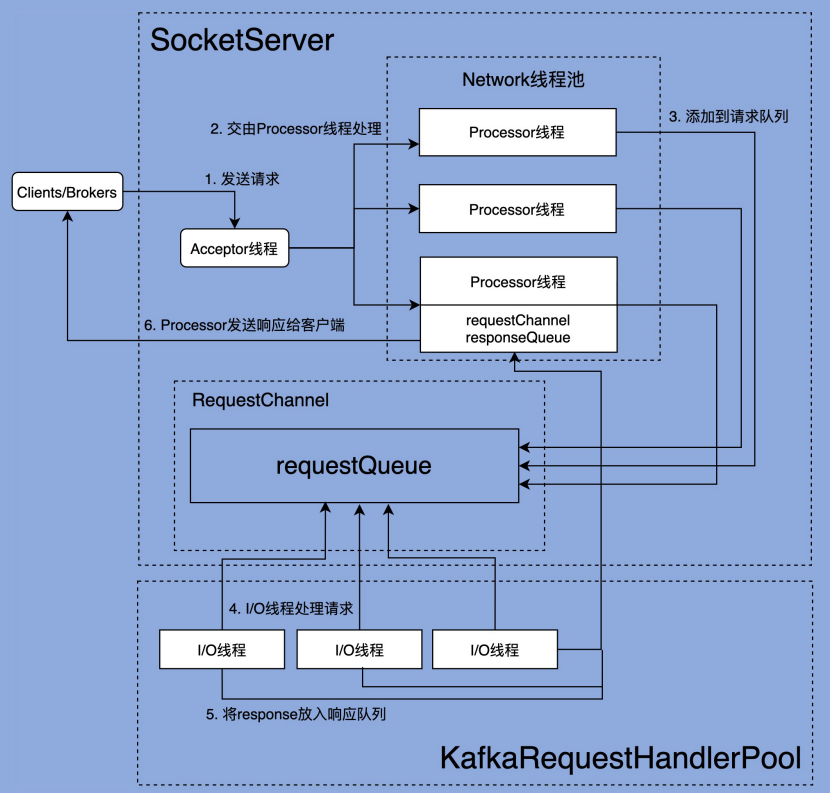
文章开头依然放上 Kafka 的网络通信架构图。
第三节中阅读了 SocketServer 部分的源码,知道了请求时如何接收并返回的。这一节我们一起阅读一下 KafkaRequestHandler 的源码,看看 IO 线程是如何工作的。
IO线程池:KafkaRequestHandlerPool
KafkaRequestHandler 是 IO 线程,那么自然而然的,就应该有一个线程池去调度它,这就是 KafkaRequestHandlerPool。
我们可以在 KafkaServer 的 startup 方法中,可以看到创建这个线程池的代码:
  // KafkaApis 是 kafka 真正处理请求逻辑的地方
  dataPlaneRequestProcessor = new KafkaApis(socketServer.dataPlaneRequestChannel, replicaManager, adminManager, groupCoordinator, transactionCoordinator,
    kafkaController, zkClient, config.brokerId, config, metadataCache, metrics, authorizer, quotaManagers,
    fetchManager, brokerTopicStats, clusterId, time, tokenManager, brokerFeatures, featureCache)

  // 创建 RequestHandlerPool 线程池
  dataPlaneRequestHandlerPool = new KafkaRequestHandlerPool(config.brokerId, socketServer.dataPlaneRequestChannel, dataPlaneRequestProcessor, time,
    config.numIoThreads, s"${SocketServer.DataPlaneMetricPrefix}RequestHandlerAvgIdlePercent", SocketServer.DataPlaneThreadPrefix)

  // 如果启用了 control plane 特性
  // 这里同样也会去创建一套 RequestProcessor 和 RequestHandlerPool
  socketServer.controlPlaneRequestChannelOpt.foreach { controlPlaneRequestChannel =>
    controlPlaneRequestProcessor = new KafkaApis(controlPlaneRequestChannel, replicaManager, adminManager, groupCoordinator, transactionCoordinator,
      kafkaController, zkClient, config.brokerId, config, metadataCache, metrics, authorizer, quotaManagers,
      fetchManager, brokerTopicStats, clusterId, time, tokenManager, brokerFeatures, featureCache)

    controlPlaneRequestHandlerPool = new KafkaRequestHandlerPool(config.brokerId, socketServer.controlPlaneRequestChannelOpt.get, controlPlaneRequestProcessor, time,
      1, s"${SocketServer.ControlPlaneMetricPrefix}RequestHandlerAvgIdlePercent", SocketServer.ControlPlaneThreadPrefix)
  }
下面是 KafkaRequestHandlerPool 的源码,我们可以清楚的看到,在它构造方法中,通过 createHandler 方法创建了 numThreads 个 handler 线程:
class KafkaRequestHandlerPool(val brokerId: Int,
                              val requestChannel: RequestChannel,
                              val apis: ApiRequestHandler,
                              time: Time,
                              numThreads: Int,
                              requestHandlerAvgIdleMetricName: String,
                              logAndThreadNamePrefix : String) extends Logging with KafkaMetricsGroup {

  // 线程池大小,由配置文件中的 num.io.threads 控制
  // 这个参数是支持动态调整的,因此是一个 AtomicInteger 类
  private val threadPoolSize: AtomicInteger = new AtomicInteger(numThreads)

  /* a meter to track the average free capacity of the request handlers */
  private val aggregateIdleMeter = newMeter(requestHandlerAvgIdleMetricName, "percent", TimeUnit.NANOSECONDS)

  this.logIdent = "[" + logAndThreadNamePrefix + " Kafka Request Handler on Broker " + brokerId + "], "

  // 负责保存子线程,即 KafkaRequestHandler 线程
  val runnables = new mutable.ArrayBuffer[KafkaRequestHandler](numThreads)

  // 创建 handler 线程
  for (i <- 0 until numThreads) {
    createHandler(i)
  }

  def createHandler(id: Int): Unit = synchronized {
    runnables += new KafkaRequestHandler(id, brokerId, aggregateIdleMeter, threadPoolSize, requestChannel, apis, time)
    KafkaThread.daemon(logAndThreadNamePrefix + "-kafka-request-handler-" + id, runnables(id)).start()
  }

  def resizeThreadPool(newSize: Int): Unit = synchronized {
    val currentSize = threadPoolSize.get
    info(s"Resizing request handler thread pool size from $currentSize to $newSize")
    if (newSize > currentSize) {
      for (i <- currentSize until newSize) {
        createHandler(i)
      }
    } else if (newSize < currentSize) {
      for (i <- 1 to (currentSize - newSize)) {
        runnables.remove(currentSize - i).stop()
      }
    }
    threadPoolSize.set(newSize)
  }

  def shutdown(): Unit = synchronized {
    info("shutting down")
    for (handler <- runnables) {
      // 向 RequestChannel.requestQueue() 中塞一个 ShutdownRequest
      handler.initiateShutdown()
    }
    for (handler <- runnables) {
      // 这里会阻塞, 直到 KafkaRequestHandler 读到 ShutdownRequest 的时候,
      // 并 shutdown 自己为止
      handler.awaitShutdown()
    }
    info("shut down completely")
  }
}
IO线程:KafkaRequestHandler
对于处理业务的 handler 线程,我们自然要看一看它的 run 方法了:
  def run(): Unit = {
    while (!stopped) {
      // We use a single meter for aggregate idle percentage for the thread pool.
      // Since meter is calculated as total_recorded_value / time_window and
      // time_window is independent of the number of threads, each recorded idle
      // time should be discounted by # threads.
      //
      // 跟踪线程池的总空闲时间比例
      // Meter 的值是通过 total_recorded_value / time_window 计算的
      // 其中:
      // total_recorded_value 是总的记录值。
      // time_window 是一个时间窗口,独立于线程数量。
      //
      // 因为这个指标是测量线程池中所有线程的整体空闲情况,而不是单个线程的。
      // 所以要除以线程数,对每个线程的空闲时间进行折算,照线程总数进行平摊。
      // 这样可以提供一个更准确的度量,显示线程池的整体闲置率,而不是单个线程的状态。
      val startSelectTime = time.nanoseconds

      // 其实就是从 RequestChannel 的 requestQueue 中取出一个请求
      val req = requestChannel.receiveRequest(300)

      val endTime = time.nanoseconds
      val idleTime = endTime - startSelectTime

      // 当前线程的空闲时间/线程数 进行折算
      aggregateIdleMeter.mark(idleTime / totalHandlerThreads.get)

      req match {

        // 如果是 shutdown 请求,则退出
        case RequestChannel.ShutdownRequest =>
          debug(s"Kafka request handler $id on broker $brokerId received shut down command")
          shutdownComplete.countDown()
          return

        // 正常的 request
        case request: RequestChannel.Request =>
          try {
            request.requestDequeueTimeNanos = endTime
            trace(s"Kafka request handler $id on broker $brokerId handling request $request")

            // 调用 KafkaApi 类去处理业务逻辑
            apis.handle(request)

          } catch {
            case e: FatalExitError =>
              shutdownComplete.countDown()
              Exit.exit(e.statusCode)
            case e: Throwable => error("Exception when handling request", e)
          } finally {
            request.releaseBuffer()
          }

        case null => // continue
      }
    }
    shutdownComplete.countDown()
  }
到这里我们就和第三节连起来了,Processor 线程接收请求,将其封装为 Request,放到 RequestChannel 中的 requestQueue 中,然后 KafkaRequestHandler 线程循环去从这个队列中拉取请求,再通过 KafkaApis 类去实际处理。
KafkaApis: 处理业务
KafkaApis 是 Broker 端所有功能的入口,其中的 handle 方法封装了所有 RPC 请求的具体处理逻辑。
参考下面的代码,如果我们要自定义方法,只需要新增一个 ApiKeys 枚举,然后在这里新增 handleXXXRequest 方法就可以了。
  override def handle(request: RequestChannel.Request): Unit = {
    try {
      trace(s"Handling request:${request.requestDesc(true)} from connection ${request.context.connectionId};" +
        s"securityProtocol:${request.context.securityProtocol},principal:${request.context.principal}")
      request.header.apiKey match {
        case ApiKeys.PRODUCE => handleProduceRequest(request)
        case ApiKeys.FETCH => handleFetchRequest(request)
        case ApiKeys.LIST_OFFSETS => handleListOffsetRequest(request)
        case ApiKeys.METADATA => handleTopicMetadataRequest(request)
        case ApiKeys.LEADER_AND_ISR => handleLeaderAndIsrRequest(request)
        case ApiKeys.STOP_REPLICA => handleStopReplicaRequest(request)
        case ApiKeys.UPDATE_METADATA => handleUpdateMetadataRequest(request)
        case ApiKeys.CONTROLLED_SHUTDOWN => handleControlledShutdownRequest(request)
        case ApiKeys.OFFSET_COMMIT => handleOffsetCommitRequest(request)
        case ApiKeys.OFFSET_FETCH => handleOffsetFetchRequest(request)
        case ApiKeys.FIND_COORDINATOR => handleFindCoordinatorRequest(request)
        case ApiKeys.JOIN_GROUP => handleJoinGroupRequest(request)
        case ApiKeys.HEARTBEAT => handleHeartbeatRequest(request)
        case ApiKeys.LEAVE_GROUP => handleLeaveGroupRequest(request)
        case ApiKeys.SYNC_GROUP => handleSyncGroupRequest(request)
        case ApiKeys.DESCRIBE_GROUPS => handleDescribeGroupRequest(request)
        case ApiKeys.LIST_GROUPS => handleListGroupsRequest(request)
        case ApiKeys.SASL_HANDSHAKE => handleSaslHandshakeRequest(request)
        case ApiKeys.API_VERSIONS => handleApiVersionsRequest(request)
        case ApiKeys.CREATE_TOPICS => handleCreateTopicsRequest(request)
        case ApiKeys.DELETE_TOPICS => handleDeleteTopicsRequest(request)
        case ApiKeys.DELETE_RECORDS => handleDeleteRecordsRequest(request)
        case ApiKeys.INIT_PRODUCER_ID => handleInitProducerIdRequest(request)
        case ApiKeys.OFFSET_FOR_LEADER_EPOCH => handleOffsetForLeaderEpochRequest(request)
        case ApiKeys.ADD_PARTITIONS_TO_TXN => handleAddPartitionToTxnRequest(request)
        case ApiKeys.ADD_OFFSETS_TO_TXN => handleAddOffsetsToTxnRequest(request)
        case ApiKeys.END_TXN => handleEndTxnRequest(request)
        case ApiKeys.WRITE_TXN_MARKERS => handleWriteTxnMarkersRequest(request)
        case ApiKeys.TXN_OFFSET_COMMIT => handleTxnOffsetCommitRequest(request)
        case ApiKeys.DESCRIBE_ACLS => handleDescribeAcls(request)
        case ApiKeys.CREATE_ACLS => handleCreateAcls(request)
        case ApiKeys.DELETE_ACLS => handleDeleteAcls(request)
        case ApiKeys.ALTER_CONFIGS => handleAlterConfigsRequest(request)
        case ApiKeys.DESCRIBE_CONFIGS => handleDescribeConfigsRequest(request)
        case ApiKeys.ALTER_REPLICA_LOG_DIRS => handleAlterReplicaLogDirsRequest(request)
        case ApiKeys.DESCRIBE_LOG_DIRS => handleDescribeLogDirsRequest(request)
        case ApiKeys.SASL_AUTHENTICATE => handleSaslAuthenticateRequest(request)
        case ApiKeys.CREATE_PARTITIONS => handleCreatePartitionsRequest(request)
        case ApiKeys.CREATE_DELEGATION_TOKEN => handleCreateTokenRequest(request)
        case ApiKeys.RENEW_DELEGATION_TOKEN => handleRenewTokenRequest(request)
        case ApiKeys.EXPIRE_DELEGATION_TOKEN => handleExpireTokenRequest(request)
        case ApiKeys.DESCRIBE_DELEGATION_TOKEN => handleDescribeTokensRequest(request)
        case ApiKeys.DELETE_GROUPS => handleDeleteGroupsRequest(request)
        case ApiKeys.ELECT_LEADERS => handleElectReplicaLeader(request)
        case ApiKeys.INCREMENTAL_ALTER_CONFIGS => handleIncrementalAlterConfigsRequest(request)
        case ApiKeys.ALTER_PARTITION_REASSIGNMENTS => handleAlterPartitionReassignmentsRequest(request)
        case ApiKeys.LIST_PARTITION_REASSIGNMENTS => handleListPartitionReassignmentsRequest(request)
        case ApiKeys.OFFSET_DELETE => handleOffsetDeleteRequest(request)
        case ApiKeys.DESCRIBE_CLIENT_QUOTAS => handleDescribeClientQuotasRequest(request)
        case ApiKeys.ALTER_CLIENT_QUOTAS => handleAlterClientQuotasRequest(request)
        case ApiKeys.DESCRIBE_USER_SCRAM_CREDENTIALS => handleDescribeUserScramCredentialsRequest(request)
        case ApiKeys.ALTER_USER_SCRAM_CREDENTIALS => handleAlterUserScramCredentialsRequest(request)
        case ApiKeys.ALTER_ISR => handleAlterIsrRequest(request)
        case ApiKeys.UPDATE_FEATURES => handleUpdateFeatures(request)
        // Until we are ready to integrate the Raft layer, these APIs are treated as
        // unexpected and we just close the connection.
        case ApiKeys.VOTE => closeConnection(request, util.Collections.emptyMap())
        case ApiKeys.BEGIN_QUORUM_EPOCH => closeConnection(request, util.Collections.emptyMap())
        case ApiKeys.END_QUORUM_EPOCH => closeConnection(request, util.Collections.emptyMap())
        case ApiKeys.DESCRIBE_QUORUM => closeConnection(request, util.Collections.emptyMap())
      }
    } catch {
      case e: FatalExitError => throw e
      case e: Throwable => handleError(request, e)
    } finally {
      // try to complete delayed action. In order to avoid conflicting locking, the actions to complete delayed requests
      // are kept in a queue. We add the logic to check the ReplicaManager queue at the end of KafkaApis.handle() and the
      // expiration thread for certain delayed operations (e.g. DelayedJoin)
      replicaManager.tryCompleteActions()
      // The local completion time may be set while processing the request. Only record it if it's unset.
      if (request.apiLocalCompleteTimeNanos < 0)
        request.apiLocalCompleteTimeNanos = time.nanoseconds
    }
  }
资源访问控制: authorizer
我会选择其中的两个方法详细学习,在此之前,我们需要先了解一下 authorize 方法。如果配置文件里没有配置 authorizer.class.name 参数,就不会启用身份验证,所有的操作都是开放的。如果配置了这个参数,在 KafkaApis 处理实际业务之前,都会用 authorize 方法判断一下 Request 的权限是否正确,比如说,这是一个创建 Topic 的请求,那么就要校验客户端有没有创建 Topic 的权限,成功之后才会继续执行,否则就会返回错误信息给客户端。
我们同样可以在 KafkaServer 的 startup() 方法中找到 authorizer 的创建和配置过程:
  // 从配置文件的 authorizer.class.name 配置中读出应用的 auth 类,实例化并返回
  authorizer = config.authorizer

  // 调用 authorize 类的 configure 方法做具体的配置
  authorizer.foreach(_.configure(config.originals))

  // 开始加载 metadata,并返回一个可以表示 authorizer 已经异步初始化经完成的 CompletableFuture
  //
  // 目的是:用户自定义的 authorize 类在初始化过程中,可能需要一些异步的操作,为了保证
  //        在 Acceptor 和 Processor开始接受请求的时候,这些异步操作全部都可以完成,
  //        需要这么一个标志位
  //
  // 事实上:目前 kafka 所提供的 authorize 类中,并没有异步操作,这里返回的就是 completed Future
  //         这是给用户自定义 authorize 类留下了空间
  val authorizerFutures: Map[Endpoint, CompletableFuture[Void]] = authorizer match {

    case Some(authZ) =>
      authZ.start(brokerInfo.broker.toServerInfo(clusterId, config)).asScala.map { case (ep, cs) =>
        ep -> cs.toCompletableFuture
      }

    case None =>
      // 如果没有配置 authorize 类,则什么都不做,返回一个 completed Future
      brokerInfo.broker.endPoints.map { ep =>
        ep.toJava -> CompletableFuture.completedFuture[Void](null)
      }.toMap
  }

  ......

  // 在 KafkaServer.startup() 方法的最后,启动 Acceptor 和 Processor 之前,
  // 会调用 CompletableFuture.join(),等待上面的 CompletableFuture 完成
  // 即:authorizer 真正初始化完成之后,kafka 才会去处理客户端请求
  socketServer.startProcessingRequests(authorizerFutures)
具体 authorize 过程我们这里暂时不做研究。
发送响应 sendResponse
业务处理的细节目前暂不研究,我们看一下处理完业务之后,是如何发送响应的,下面是 KafkaApis 中的 sendResponse() 方法:
  private def sendResponse(request: RequestChannel.Request,
                           responseOpt: Option[AbstractResponse],
                           onComplete: Option[Send => Unit]): Unit = {
    // Update error metrics for each error code in the response including Errors.NONE
    responseOpt.foreach(response => requestChannel.updateErrorMetrics(request.header.apiKey, response.errorCounts.asScala))

    val response = responseOpt match {
      case Some(response) =>
        val responseSend = request.context.buildResponse(response)
        val responseString =
          if (RequestChannel.isRequestLoggingEnabled) Some(response.toString(request.context.apiVersion))
          else None
        new RequestChannel.SendResponse(request, responseSend, responseString, onComplete)
      case None =>
        new RequestChannel.NoOpResponse(request)
    }

    // 这里其实就是把响应放到了 RequestChannel 的 responseQueue 中
    // 等待上一节提到的 Processor 线程的 processNewResponses() 方法去处理
    requestChannel.sendResponse(response)
  }